
Ivy Pay
Guide to Accessing Superbills
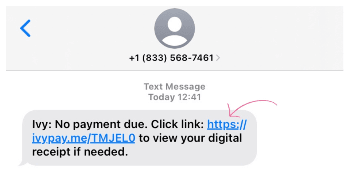
A superbill is a detailed record of services provided to a patient by an out-of-network provider. It serves as proof of service and includes specific medical codes, provider information, patient details, and service costs. Patients use the superbill to submit a claim to their insurance company for potential reimbursement. After each therapy session, you will receive a text message from Ivy Pay. Open the text message (see below) and click on the link which will direct you to the receipt for your session.
Once clicking on the link, Ivy Pay will take you to a secure page where you can view the receipt from your session and the corresponding services. If you scroll to the bottom of the page, you’ll see a link for “Superbill” in the footer (see below).
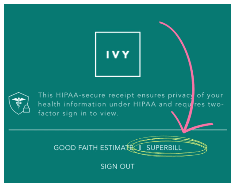
Upon clicking the “Superbill” link, you will be prompted to enter your email address. Ivy Pay will generate your superbill and send it directly to the provided email address. Let me know if you need help with this process!
